
The date picker allows users to determine the date range of the data to be displayed on the dashboard. It is available on the top right corner of the screen. The selected date range is highlighted in green. The default selection is set as MTD (Month to Date), i.e. from the start of the current month until today.
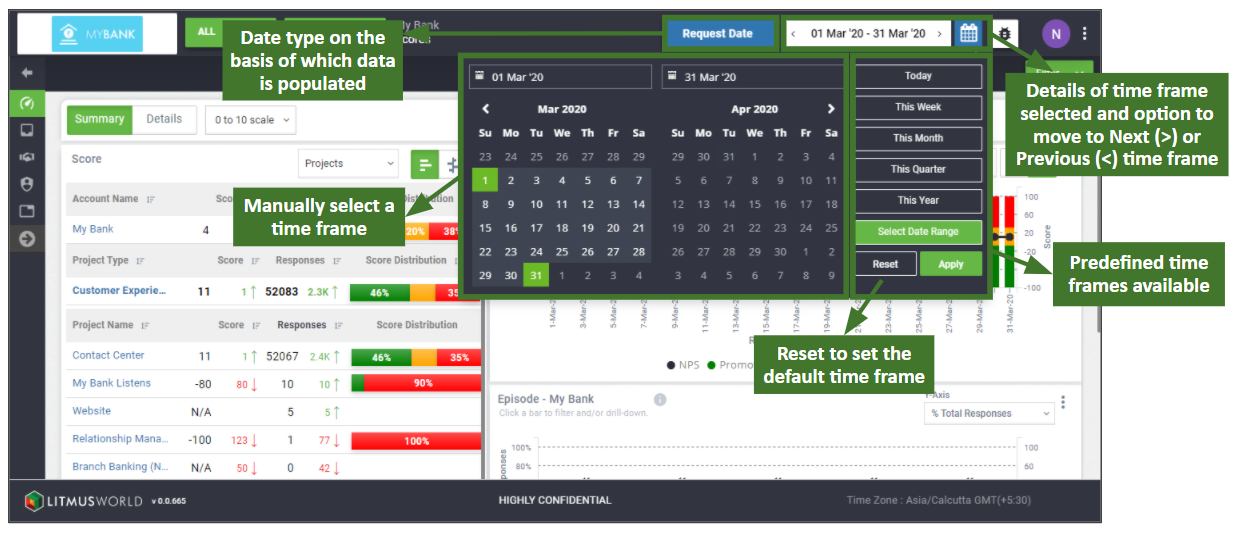
Select or change the date range by clicking on the calendar icon on the top right corner of the screen. The start date and end date range can be manually selected by picking dates on the calendar. There is also an option to select a predefined time frame from a set of options (see list below).
| Predefined Time Frame | Description |
| Today | Today’s date is selected. |
| This Week | The current week is selected (Mon to Sun). i.e. If today’s date is 19 Nov 2020 (Fri), the current week selection would be 16 Nov 2020 (Mon) to 22 Nov 2020 (Fri). |
| This Month | The current month is selected. i.e. If today’s date is 19 Nov 2020, the current month selection would be 1 Nov 2020 to 30 Nov 2020. |
| This Quarter | The current quarter is selected. i.e. If today’s date is 19 Nov 2020, the current quarter selection would be 1 Oct 2020 to 31 Dec 2020. |
| This Year | The current year is selected. i.e. If today’s date is 19 Nov 2020, the current year selection would be 1 Jan 2020 to 31 Dec 2020. |
Click on the < or > arrows in the date picker to change to the previous or next set of dates in the selected time frame. i.e. if the selected time frame is This Month (Oct 2020), clicking the < arrow will change it to the previous month (Sep 2020). Click Reset to bring it back to the default selection (Month to Date).