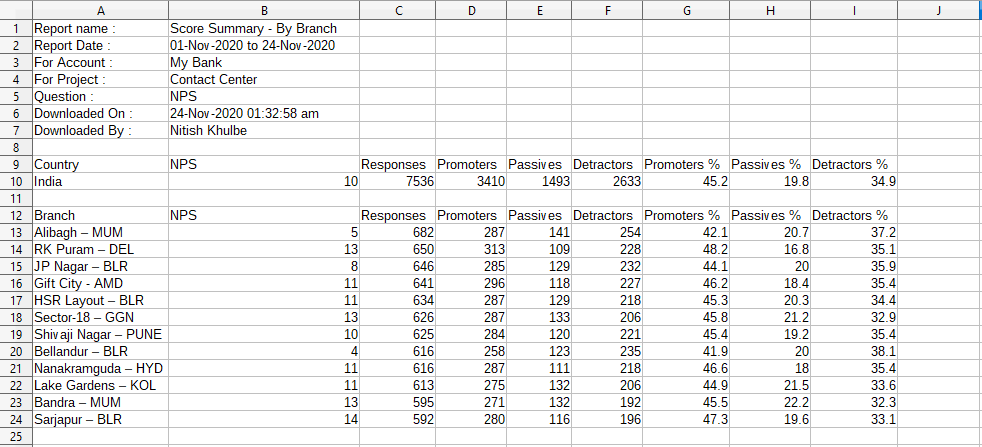
All widgets on the dashboard allow a data download in CSV format. The download option is accessible via the the icon (three dots) at the top right corner of each widget.
The progress of the file download is displayed on a panel at the bottom left of the dashboard. Click the panel to access the file.
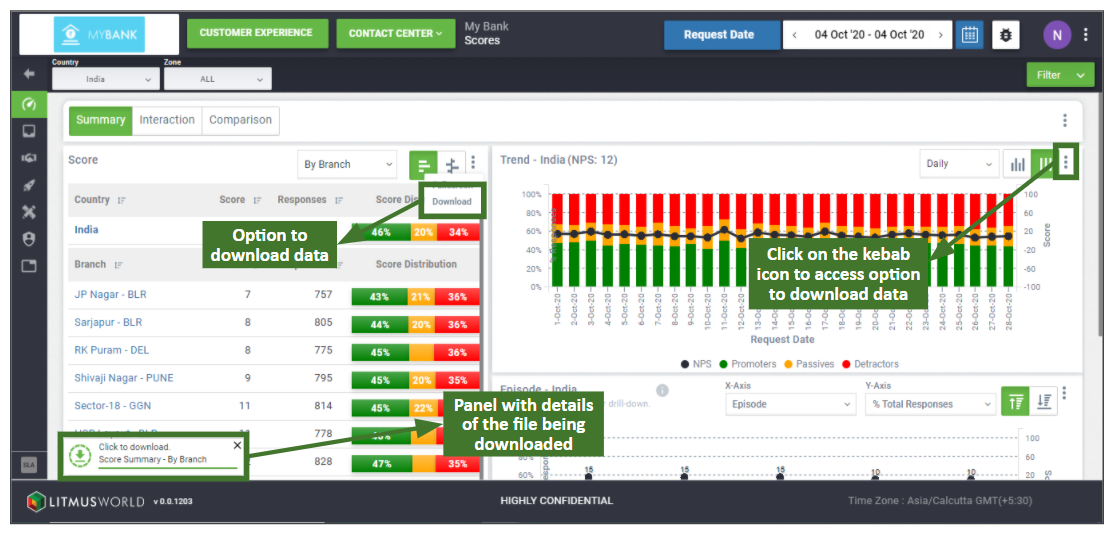
The downloaded file contains data from the widget, as well as:
- Report Name – Details of the tab from which the data was downloaded along with the parameter/aggregation type.
- Time Frame – Time frame for which the data was generated.
- Account Name – The account for which the data was generated.
- Project Name – The project for which the data was generated. Not available if data was downloaded from the account dashboard.
- Question – The question for which data was generated in the report. Not available if data was downloaded from the account dashboard.
- Downloaded On – Time stamp of when the download data request was raised.
- Downloaded By – User who had raised the download data request.
A sample of how the data is downloaded for the list view on score summary: