
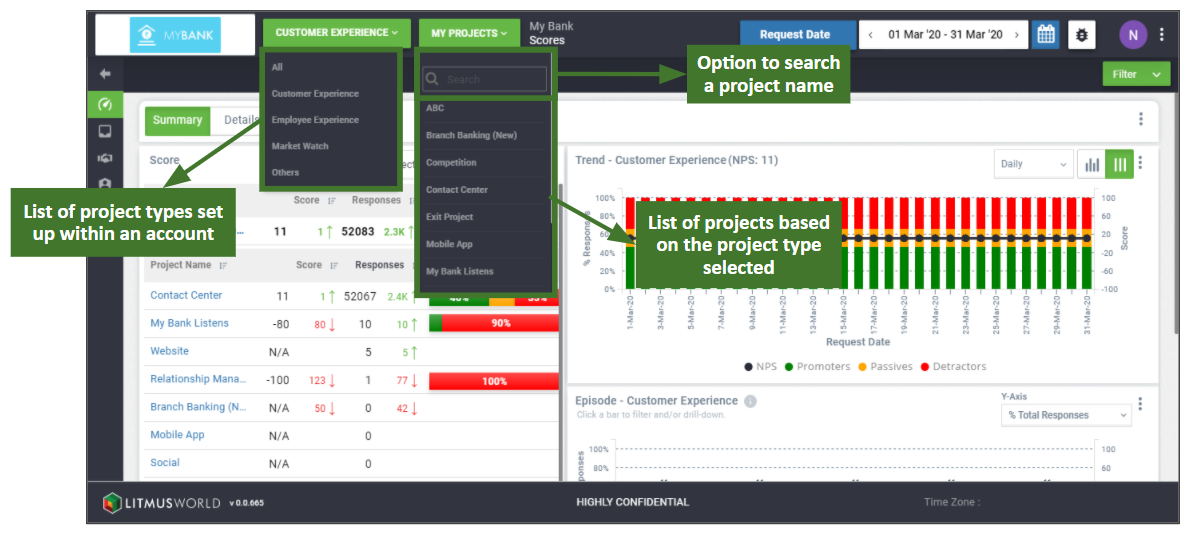
The project selector is available on the top panel of the screen towards the left, next to the Account/Project logo. One can click on the drop down option available to access the list of projects available and select any project from it to navigate to its project dashboard.
The projects listed are in alphabetical order of their names and reads ‘My Projects’ in case one is on the account dashboard. Once you select a project, the project’s name would show up on the project selector. On the project dashboard, the project selector would have ‘All Projects’ as an additional option available, selecting which would navigate one to the account dashboard.
Project Type
Project type defines the type of experience for which the project has been set up e.g.: Customer Experience, Employee Experience etc. They can also be used to group projects by any custom defined groups too.
Also available for selection along with the project selector is the project type selector which shows up only if projects of different types to grouped together. By default ‘All’ is selected as the option on the project type selector. The options available on the project list get filtered out based on the project type selected.