
Inbox provides a complete, real-time list of customer responses across all channels in a single view. The responses are shown in a reverse chronological manner, i.e., the latest response is shown first.
- Each response shown in the Inbox tab consists of Primary rating, Project Name ,customer name, touchpoint name, response text (comments given by the customer on the open-ended question), response date and its status.
- For projects with data-masking enabled, the PII information of the customer will always be masked in the Inbox tab.
- All responses are shown for the selection made in the date picker.
Account Inbox
Account Inbox gives a view of responses coming from multiple projects under an account.

- To view issues which are assigned to you, click on ‘All Issues’ drop down in the left top corner and select ‘Assigned to me’. If there are no responses assigned to you, the message – “No responses are assigned to you” – is shown.
- To view issues which are followed by you, click on ‘All Issues’ drop down in the left top corner and select ‘Followed by me’.
- To view the list of unread issues, click on the ‘Unread’ button.
- All responses can be viewed as per the Request/Response Date and sorted as per newest or oldest responses first.
Project Inbox
Project Inbox gives a view of all responses coming for the respective project. All responses are shown for the date range selected – default selection is MTD (month to date). All responses are sorted by newest first. Click on ‘Response Date’ filter to view responses based on Response/Request date, i.e., date when the customer responded/ was contacted.
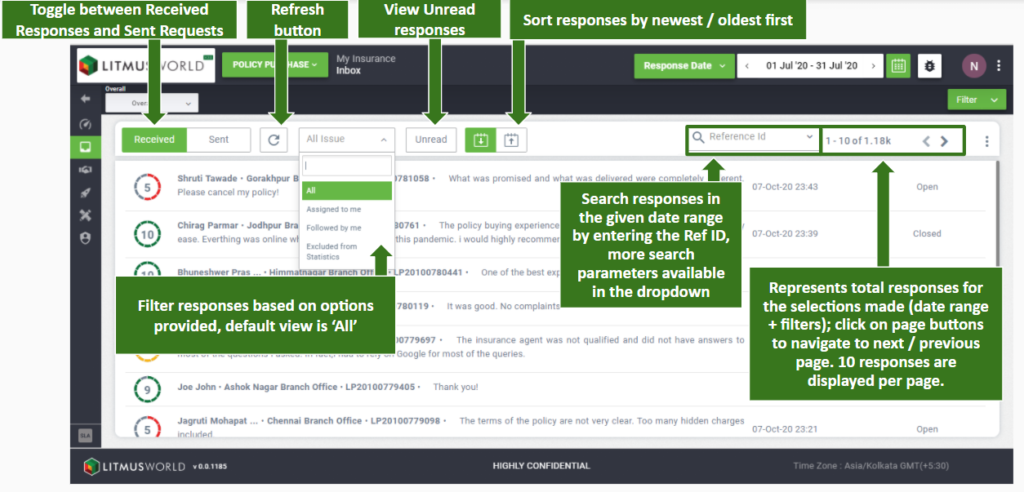
The following controls are present at this view:
- Received/Sent button: click here to toggle between received responses and requests that were sent to the customer
- Refresh button: to refresh the list of responses without changing the saved selections of filter/view by settings
- All/Assigned to me/Followed by me: a dropdown to select the responses to be displayed
- All – all responses (default)
- Assigned to me – only the responses which are assigned to the user viewing this list
- Followed by me – only the responses for which the user has been added as a follower
- Unread button: to view all unopened responses
- Sort buttons: to sort responses by newest/oldest first
- Users also have the ability to search a particular response by entering the Ref ID of the response
- Note: Search will always run for the given date range
- If no responses are filtered, please try changing the filters applied
- Date, time and status of a response is represented on the right side
- At a time, 10 responses are displayed. Click on the page navigators at the far right of the Inbox header to navigate as needed.